Launching to early access soon
Know what will rank. Before you make it.
Chadwords scores every topic on whether a channel your size can actually win it. Other keyword tools show you search volume. We show you what you can rank.
No API keys. No Search Console setup. Just type a topic.
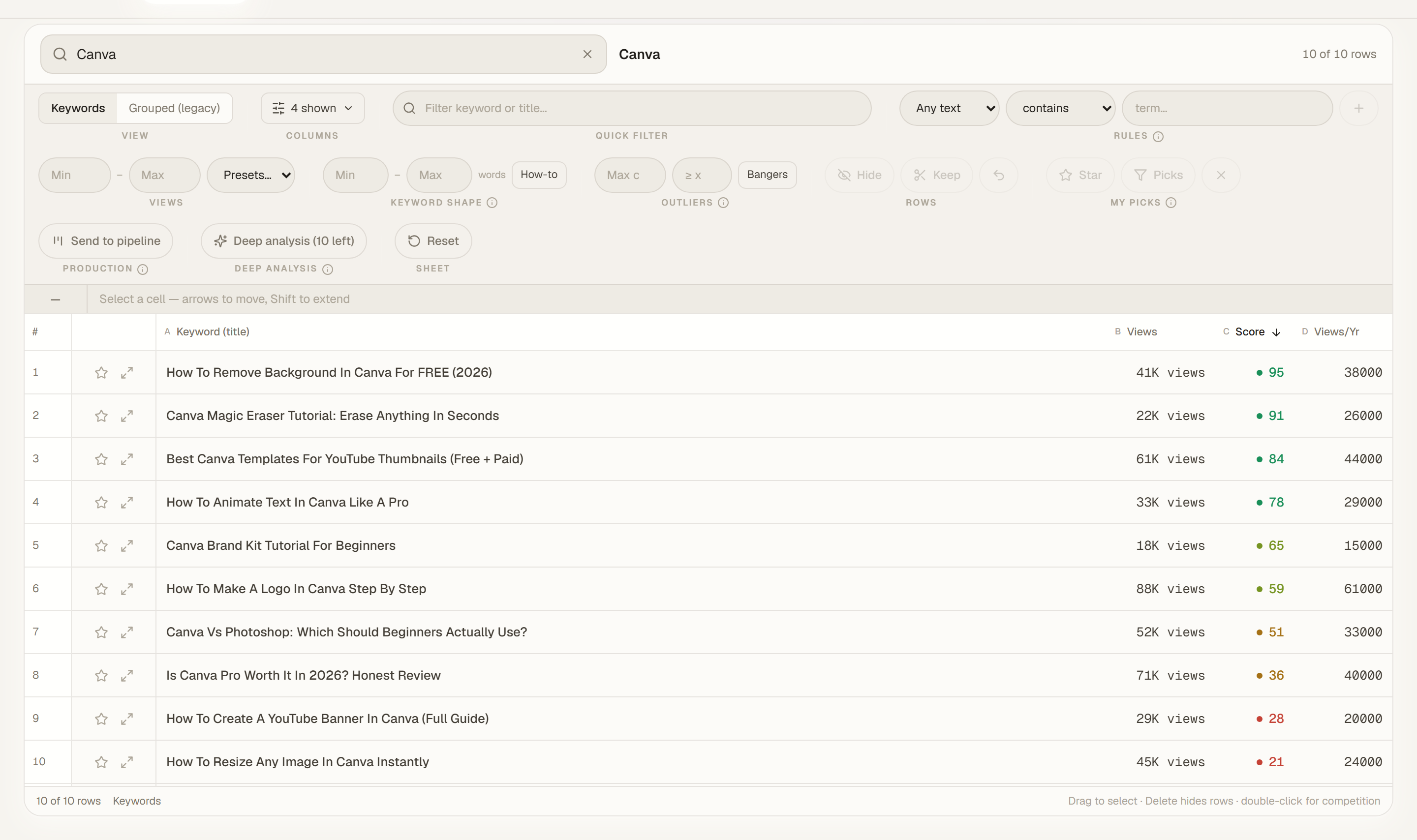
An actual list inside Chadwords. Green scores are your best bets, red ones are skips.
Demo
See it in action
A quick walkthrough of how Chadwords scores topics, builds your list, and runs your production pipeline.
fewer dud keywords make it to your camera
That's the range channels typically cut once they check a keyword's Score before scripting it instead of after filming it. Every keyword you skip because it was never winnable is a video your editor didn't waste a week cutting.
The problem
Picking topics blind is expensive
You research for hours, then find out you can't win
You find a keyword with real search volume, script the video, film it, and it lands on page three behind ten channels three times your size. The volume was real. Your odds never were.
Every keyword tool shows you the same numbers
Search volume, difficulty score, done. None of it tells you whether a channel your size can actually crack page one this month, or in a year.
Your team doesn't know what to film next
Ideas live in your head, in a doc, in a group chat. Editors wait on you. Nothing ships on a schedule because there's no schedule to follow.
How it finds winners
See exactly which topics you can actually win
Type a niche, a product, or a topic. Chadwords pulls every real search people are typing around it on YouTube, not just the obvious head terms. Long-tail questions, comparisons, "how to" phrasing, all of it. One seed regularly turns into hundreds or thousands of ideas.
Every single one comes back with a Score from 0 to 100. That number isn't search volume and it isn't a generic difficulty rating. It looks at how strong the channels currently ranking for that topic actually are, based on their real win rate across searches, not their subscriber count, and it weighs that against the size of your own channel. The same keyword scores completely differently for a brand-new channel than it does for one with two years of videos behind it.
Sort by Score and the winners rise straight to the top of the list. Green means go, red means skip it, and everything in between tells you how close a call it really is, before you've spent a minute scripting.
How your team runs on it
Turn a keyword list into videos, with your whole team in the loop
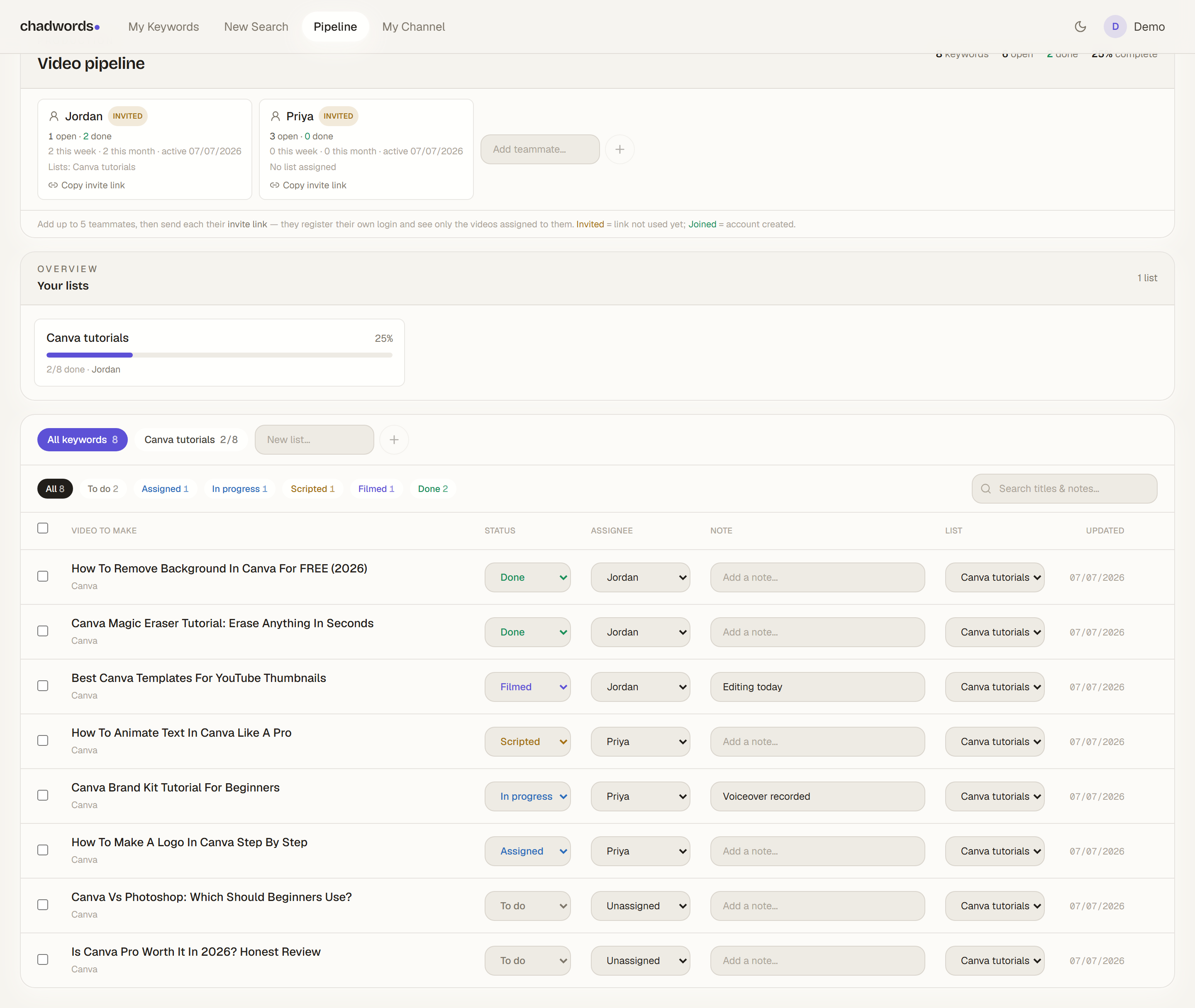
Send your best keywords straight into a production list. Assign the list to a teammate and every video on it shows up in their workspace immediately, no export, no copy-pasting into a shared doc.
Invite up to five teammates with a link. They register their own login and land in a workspace that only shows what's assigned to them, nothing about your research, your scores, or anyone else's videos.
Every video moves through a real status: To do, Assigned, Scripted, Filmed, Done, or Not doable, with a note field for context. You see a completion percentage on every list, plus how many videos each teammate finished this week and this month, so you always know who's shipping and who isn't.
Lists are locked against copy-paste on the way out, so the research you paid for stays inside the tool.
And the rest
Everything else between an idea and a published video
Deep Analysis before you commit a month to a list
Score gives you an instant read the moment a keyword shows up. Before you hand a whole list to your team, run Deep Analysis on it: it re-checks the live competition on your shortlist right now and hands back a verified score. You'll see exactly how many analyses you have left and watch it work in real time.
Your own channel, tracked without any setup
Connect your channel to see your own Channel Strength score and watch your videos' real search rankings move week to week, no API keys required. Upload your Studio analytics and get AI advice built around your actual RPMs and top earners, cross-referenced with how you're ranking, not generic tips copy-pasted for every channel.
An engine that gets sharper the longer you use it
Every week, it checks how real search results actually shifted: which channels broke into a topic, which held their spot, which quietly dropped off. That gets folded back into future scores. Other tools hand you a static snapshot. This one keeps learning from what actually happened.
How it works
From topic to published video
Type a topic
One niche, product, or seed keyword. That's the whole input.
Get scored instantly
Every result comes back with a Score sized to a channel your size.
Build your list
Pull the winners into a production list and hand it to your team in one click.
Ship on schedule
Your team works the pipeline while you watch completion move in real time.
Your research stays yours
Every account is encrypted, sessions are locked to one device at a time, and two-factor authentication is available for anyone who wants it. Your lists, scores, and channel data are visible to your account alone.
Pricing
One plan. Everything included.
Discovery, scoring, the production pipeline, team seats, and channel tracking. No feature paywalls inside the app.
Every plan includes
- Keyword research for any niche you cover
- Every topic scored for a channel your size
- Real demand and competition data on each keyword
- Production pipeline to plan and track videos with your team
- Rank tracking and channel analytics for your videos
- Team seats so editors work straight from your lists
Taking one of our partner courses? You've got a discount code waiting at checkout.
Questions
Frequently asked
Does this work for any niche, or just software tutorials?
It was built on business software tutorials, but the discovery and scoring engine works on any topic with real YouTube search demand. If people are searching for it, it can find it.
Do I need a YouTube API key or Google Search Console access?
No. Nothing to connect, nothing to configure. Type a topic and it goes to work.
Can my editors and VAs use it too?
Yes. Invite up to five teammates from your dashboard with a link. They get their own login and only see the videos assigned to them, not your research or your scores.
What happens to my account if I cancel?
Your subscription and your team's access end at the close of your billing period. You can manage, pause, or cancel any time from your billing settings.
Is my keyword research private?
Yes. Your lists, scores, and channel data are scoped to your account alone. Nobody else using the platform can see them.
Stop guessing what to film next.
Pick a plan, set up your account in the next five minutes, and have your first scored list before lunch.
See plans